How to Use Canva Retro Frame and Frame Set for Stunning Design Projects
Designing visually appealing content has never been easier, thanks to tools like Canva. With its intuitive interface and wide range of templates, Canva has become a go-to platform for both beginners and professionals. One of the standout features that users love is the Canva Retro Frame and Canva Retro Frame Set. These customizable frames allow you to add a vintage or retro feel to your designs with just a few clicks. Whether you're creating social media posts, invitations, or digital art, the retro frame set can elevate your work instantly.
What Is the Canva Retro Frame?
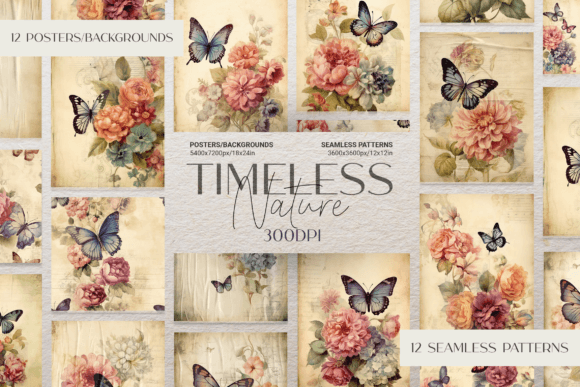
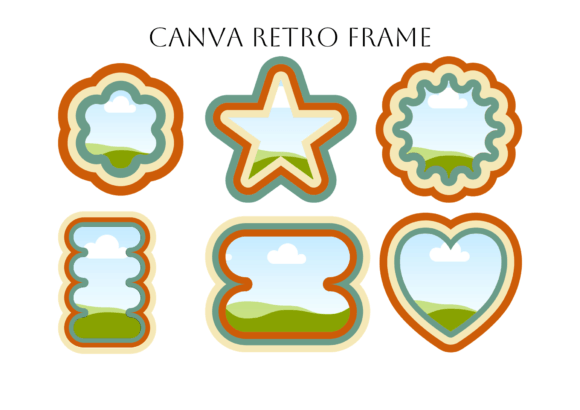
The Canva Retro Frame is a design element that lets you place images, patterns, or digital paper into a stylish, old-school frame. It’s perfect for those who want to give their projects a nostalgic vibe without spending hours on complex editing. The frame comes in various styles, from classic photo frames to ornate borders that mimic vintage illustrations.
One of the best things about the Canva Retro Frame is that it works seamlessly with both the free and pro versions of Canva. This means even if you’re on a budget, you can still create high-quality, retro-inspired designs. The Canva Custom Frame Set expands on this by offering multiple frames in one package, giving you more flexibility in your design choices.
How to Use the Canva Retro Frame Set
If you're new to using the Canva Retro Frame Set, the process is straightforward. Here's a step-by-step guide to help you get started:
- Upload the PDF File to Canva: Begin by uploading the provided PDF file containing the retro frames. You’ll find this file in the Canva Projects folder after importing it into your account.
- Select Your Desired Frame: Once the frames are uploaded, browse through them and click on the one that suits your project. To copy it, simply press CTRL + C (or CMD + C on Mac).
- Paste the Frame into Your Design: Open your current Canva design or start a new one. Then, hit CTRL + V (or CMD + V) to paste the frame into your workspace.
- Drag and Drop Your Image: Now, you can easily drag and drop your image, pattern, or digital paper into the frame. For the best quality, rotate your image first before placing it inside the frame.
This method ensures that your images fit perfectly within the frame, maintaining clarity and sharpness. The simplicity of the process makes it ideal for users who want to focus more on creativity rather than technicalities.
Why Choose the Canva Retro Frame Set?
The Canva Retro Frame Set offers several benefits that make it a must-have for any designer. Let's explore some of the key advantages:
- Versatility: The frames come in different sizes and styles, making them suitable for a variety of projects such as social media graphics, printable art, and even wedding invitations.
- Ease of Use: With the drag-and-drop functionality, even those with minimal design experience can create stunning visuals quickly.
- Compatibility: Since the frames work with both free and pro versions of Canva, they provide great value for users at all levels.
- Customization Options: You can adjust colors, add text, or overlay other elements to personalize each frame according to your needs.
These features make the Canva Retro Frame Set an excellent choice for anyone looking to enhance their designs with a touch of nostalgia and style.
Real-World Applications of the Canva Retro Frame
The Canva Retro Frame isn’t just limited to personal projects. Many businesses and marketers have found creative ways to use these frames in their branding and marketing efforts. Here are a few examples:
Social Media Marketing: Brands often use retro frames to create eye-catching posts that stand out on platforms like Instagram and Pinterest. The vintage aesthetic appeals to audiences who appreciate classic design elements.
Event Invitations: Wedding planners and event organizers frequently use the Canva Retro Frame to design invitations that evoke a sense of elegance and tradition.
Printable Art: Artists and crafters can use the frames to create unique prints that blend modern technology with traditional art forms.
By incorporating the Canva Retro Frame into these scenarios, creators can achieve a cohesive look that resonates with their target audience.
Tips for Getting the Most Out of Your Canva Retro Frame Set
To maximize the potential of your Canva Retro Frame Set, consider the following tips:
- Experiment with Different Images: Try using a mix of photos, illustrations, and textures within the frames to see what combinations work best for your project.
- Play with Colors: Adjust the color palette of your frame to match your brand or theme. This can help unify your design and make it more visually appealing.
- Use Text Overlays: Adding text over your framed images can help convey messages more effectively, whether you're promoting an event or showcasing a product.
- Layer Multiple Frames: If you're working on a larger design, layering multiple frames can add depth and dimension to your composition.
These strategies will not only enhance your designs but also help you discover new ways to use the Canva Retro Frame Set creatively.
Final Thoughts on Using Canva Retro Frame Set
Incorporating the Canva Retro Frame Set into your design workflow can be a game-changer. Its ease of use, versatility, and compatibility with both free and pro Canva accounts make it a valuable tool for designers of all skill levels. Whether you're crafting social media content, designing invitations, or exploring digital art, the retro frames offer endless possibilities for creative expression.
By following the simple steps outlined above and experimenting with different design elements, you can unlock the full potential of the Canva Retro Frame Set. So why wait? Start using it today and bring a touch of nostalgia to your next design project!